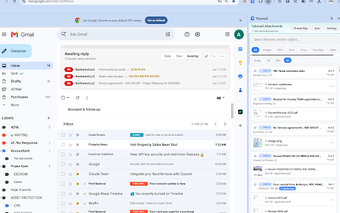
Tolomail: AI email drafting inside the Gmail compose window
Tolomail, developed by a team focused on AI productivity tools, is a Chrome extension that speeds up email composition inside Gmail. The extension uses artificial intelligence to draft messages, suggest replies, adjust tone, and condense long conversations directly in the browser compose window. Key capabilities include grammar and clarity suggestions, contextual summarization, and one-click reply suggestions. It targets busy professionals, sales and support teams, and non-native speakers who manage large daily inboxes.
How Tolomail embeds into Gmail to reduce context switching
The tool operates directly inside the Gmail interface, so users do not need to leave the compose window to get AI help. Because it integrates into the existing workflow, it provides immediate access to drafting and reply suggestions while reading a thread. The extension is available for Chrome and other Chromium-based browsers, which keeps the workflow consistent across those desktop environments.
What Tolomail's permissions mean for your inbox data
Tolomail requires permission to read and write emails to generate responses and summaries, and it processes message text for that purpose. That permission model is explicit in the product notes, so users should expect the extension to access thread content to produce context-aware output. Understanding this requirement clarifies the trade-off between in-place convenience and data access by the extension.
How Tolomail changes time spent composing and triaging messages
The developer positions the extension to reduce time on repetitive communication tasks and to minimize blank-page delays. Users report it helps overcome writer's block and speeds inbox triage by condensing long threads into short summaries. Those effects translate into fewer minutes spent reading and composing, especially for high-volume senders who need quick, consistent responses.
Who benefits and what limits the approach compared with standalone AI tools
The extension is optimized for Gmail use, so busy professionals, sales teams, support agents, and students who work inside that service get the most value. Unlike standalone AI editors, the tool is native to the compose experience, trading broad provider support for tighter in-Gmail context awareness. It also supports multiple languages, which helps international communication but keeps the scope tied to Gmail on Chromium browsers.
Practical recommendation for Gmail-focused communicators
Tolomail is a practical choice for users who write many messages in Gmail and want in-browser drafting assistance. Test its outputs on lower-risk threads first and review suggested edits before sending, since the extension requires read and write access to function. For Gmail-centric workflows, it can save time; users who rely on other providers should consider broader tools that work outside the Gmail interface.